
Pro Tips: “Let me give you a crucial tip from my side: whenever you are setting up Schema Markup for your website, make sure to include FAQs on every single page. You will only get the full benefits of the Schema if those FAQs are physically present on the page; otherwise, it won’t work correctly.”
“Look, this is my personal experience, and I am writing it right at the start of this article: before using any tool, it is essential to understand what it actually does. If you don’t even know its purpose, using it is completely pointless.
Take Schema Markup as an example. It is crucial to know what Schema is, how it works, and how many types exist. While almost everyone—including countless YouTube tutorials—explains what Schema is and why it’s used, they rarely detail all its different types. This is exactly where the team at WP Skillz stands out. They have published dedicated, comprehensive articles specifically to educate users first, so people can fully understand the concept before using the generator tool. This complete guide ensures everyone gets maximum value and help.”
Let me tell you something that most SEO guides skip over.
A client of mine ran an e-commerce store selling handmade leather goods. Good products, genuine reviews from real customers, clean WordPress site. She was ranking in position six for her main keyword. Not bad. But her click-through rate was embarrassingly low — around 1.8% despite the decent position.
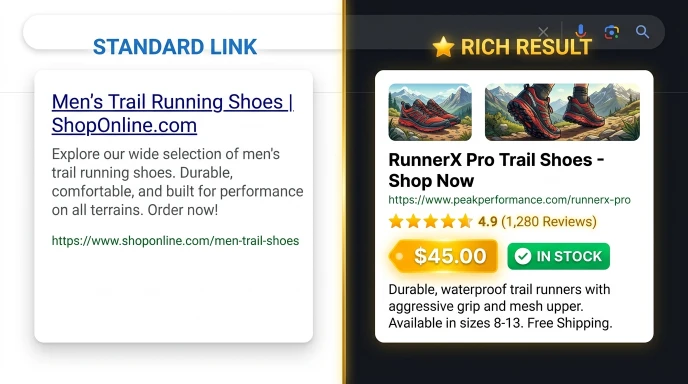
I looked at the search results for her keyword. Every single competitor above her had star ratings showing directly under their link, price ranges. Stock availability. She had a plain blue link with a meta description.
Same position. Half the clicks.
The fix took 20 minutes. We added Product schema and Review schema using the WP Skillz Schema Markup Generator. Within ten days, her listing showed five gold stars and “From $45 — In Stock.” Her CTR jumped to 4.6%. Same ranking. More than double the traffic.
That is what understanding schema markup types actually does in practice. It is not theoretical SEO — it is the difference between a listing people click and one they scroll past.
What Schema Markup Actually Is — Without the Jargon
Schema markup is a structured data vocabulary that helps search engines understand your content at a deeper level than just reading text. It is code you add to your pages — not visible to human readers — that explicitly tells Google what type of content is on the page and what the key properties are.
Think of it this way. Your article might say “John Smith is a certified accountant with 15 years of experience.” A human reader understands exactly what that means. But Google reads that as text — it has to guess whether John is the author of the article, a subject being discussed, a business contact, or something else entirely.
Schema markup removes that guesswork. You tell Google directly: John Smith is the author of this Article, published on this date, with this image.
The format Google recommends is JSON-LD — a block of code placed in the <head> section of your page that describes the content in a machine-readable structure. You do not need to know how to write this by hand. Free generators handle that part.
Why Schema Markup Types Matter More in 2026
Search in 2026 is not just Google. It is Google AI Overviews, ChatGPT search integration, Perplexity, Bing AI, and voice assistants. Every one of these systems uses structured data to identify trustworthy, citable content.
If your site does not have schema, AI search tools cannot quickly extract your key information to use in answers. You become invisible in AI-generated search results — not because your content is bad, but because it is not formatted in a way AI can easily process.
This is the core of GEO (Generative Engine Optimization) — making your content machine-readable so AI systems surface it in responses. Schema markup is the most direct technical action you can take to improve your GEO performance.
On top of that, Google’s rich results — those enhanced search listings with stars, prices, FAQ dropdowns, and event dates — are only available to pages with correct schema markup. Standard pages cannot qualify for rich results, no matter how good the content is.
The Most Important Schema Markup Types — Explained Simply
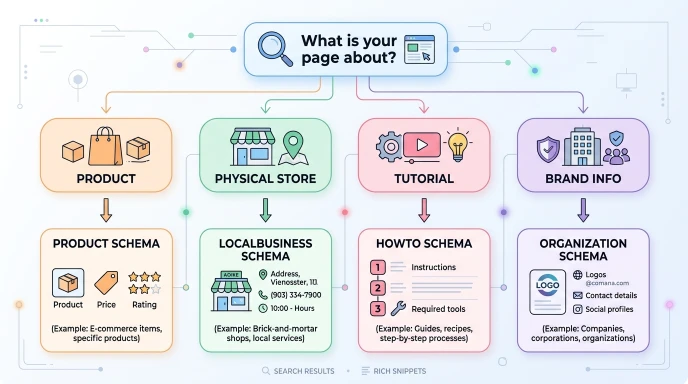
Schema.org defines over 800 types of structured data. For most WordPress sites, you need to understand about ten of them. Here is each one explained with the specific benefit it provides and who should use it.
1. Organization Schema
What it is: Your brand’s digital identity card. Tells Google your company name, logo, URL, social profiles, and contact information.
Who needs it: Every website, without exception. This is the foundation of entity-based SEO — establishing that your domain is associated with a real, identifiable brand.
What it enables: Knowledge Panel on the right side of branded search results. Better brand entity recognition by Google’s knowledge graph.
JSON-LD structure:
json
{
  "@context": "https://schema.org",
  "@type": "Organization",
  "name": "WP Skillz",
  "url": "https://wpskillz.com",
  "logo": "https://wpskillz.com/logo.png",
  "contactPoint": {
    "@type": "ContactPoint",
    "email": "wpskillzbrand@gmail.com"
  }
}
Generate this instantly using the Schema Markup Generator — select Organization, fill in your details, and copy the output.
2. LocalBusiness Schema
What it is: An extension of the Organization schema with physical location data — address, opening hours, phone number, geographic coordinates.
Who needs it: Any business with a physical location or service area. Restaurants, law firms, dental practices, repair shops, retail stores, freelancers serving a specific city.
What it enables: Eligibility for the Google Local 3-Pack — the map results that appear above organic listings for local searches. This is some of the most valuable SERP real estate available.
Unique tip: Include the hasMap property linking directly to your Google Maps listing. This creates an explicit connection between your schema entity and your Google Business Profile — a strong local SEO signal most businesses miss.
3. Product Schema
What it is: Defines a specific product with its name, description, price, currency, availability status, brand, and SKU.
Who needs it: E-commerce stores, WooCommerce sites, and affiliate review sites covering specific products.
What it enables: Price and availability shown directly in search results. Eligibility for Google Shopping rich results. Massive CTR improvement — users see the key purchase information before they click.
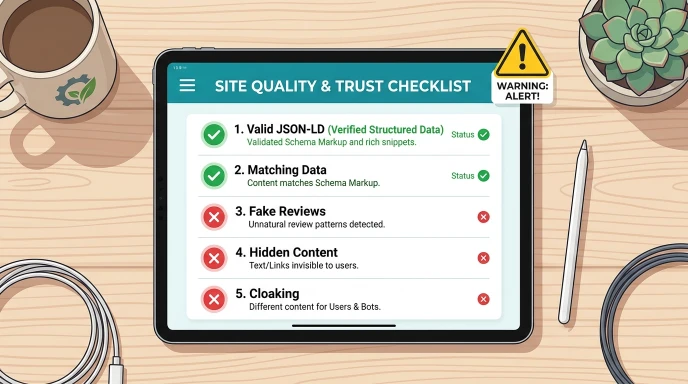
Critical detail: The availability The property must match the actual product status on your page. If your schema says “InStock” but the page shows “Out of Stock,” Google will penalize the page for deceptive structured data.
4. Review and AggregateRating Schema
What it is: Captures review data — individual reviews or an aggregate rating compiled from multiple reviews.
Who needs it: Any page with genuine customer reviews. Products, services, books, software, and local businesses.
What it enables: Gold star ratings in search results. This is the most visually impactful schema type — stars immediately draw attention before users read a single word of your listing.
Common mistake: Do not self-review your own products with fake ratings. Google verifies review data, and manual actions for manipulated review schema are common and severe.
5. FAQPage Schema
What it is: Marks up question and answer pairs on a page so Google can display them as expandable dropdowns directly under your search listing.
Who needs it: Blog posts, service pages, tool pages, any page with a genuine FAQ section.
What it enables: Your search result physically expands on the page — potentially pushing competitors lower. FAQ rich results are also a significant voice search optimization signal. When someone asks Google Assistant or Siri a question, FAQ schema pages are often the source of the spoken answer.
Unique tip: The questions in your FAQPage schema should match actual “People Also Ask” queries that appear for your target keyword. Run your keyword in Google, note the PAA questions, and structure your FAQ section around those exact questions.
The WP Skillz Schema Markup Generator includes FAQPage schema as a supported type — you add your questions and answers, it generates the correct JSON-LD automatically.
6. Article and BlogPosting Schema
What it is: Identifies your content as a news article, blog post, or editorial piece. Includes headline, author, publication date, and featured image.
Who needs it: Bloggers, news publishers, content creators, any WordPress site with regular articles.
What it enables: Eligibility for Google Discover (the personalized news feed on Android and Google mobile apps) and Google News Top Stories carousel. These placements drive significant traffic to timely content.
Important: The datePublished dateModified properties matter. Keep dateModified current when you update articles. Google uses this to assess content freshness, which is a ranking signal for informational queries.

7. HowTo Schema
What it is: Marks up step-by-step instructions with each step defined as a separate entity, including text descriptions and optional images per step.
Who needs it: Tutorial writers, recipe sites, home improvement content, and any instructional content with distinct steps.
What it enables: Rich results showing step numbers and step summaries directly in search results. On desktop, Google sometimes shows thumbnail images from each step inline in the search listing.
Warning: Only use the HowTo schema when your page genuinely contains instructions with discrete steps. Using it on a page that just has a few tips without a proper step structure violates Google’s guidelines and may result in your page being excluded from rich results.
8. VideoObject Schema
What it is: Marks up video content with title, description, thumbnail, upload date, and duration.
Who needs it: YouTube content creators embedding videos on their WordPress site, any site with original video content.
What it enables: Video thumbnail displayed directly in search results. Timestamp-based rich results show specific moments in the video. YouTube videos with proper schema also appear in Google’s video tab prominently.
9. Service Schema
What it is: Describes a professional service offering — the type of service, provider, area served, and price range.
Who needs it: Agencies, freelancers, consultants, service businesses of any kind.
What it enables: Better matching for service-based searches. When combined with the LocalBusiness schema, it dramatically improves local service query visibility.
10. BreadcrumbList Schema
What it is: Defines the navigation hierarchy of a specific page — Home > Category > Subcategory > Page.
Who needs it: Every WordPress site with a clear category structure — especially blogs and e-commerce stores.
What it enables: Breadcrumb trail displayed in search results instead of the plain URL. This shows users exactly where the page sits on your site before they click, which improves CTR for structured sites.
Schema Markup Types — Quick Reference Table
| Content Type | Best Schema | Primary SERP Benefit |
|---|---|---|
| Business website | Organization | Knowledge Panel |
| Local business | LocalBusiness | Google Local 3-Pack |
| E-commerce product | Product + Review | Price, stars, availability |
| Blog article | Article + BreadcrumbList | Google Discover, Top Stories |
| Tutorial/guide | HowTo | Step-by-step rich results |
| FAQ section | FAQPage | Expandable question dropdowns |
| Video content | VideoObject | Thumbnail in search results |
| Service page | Service + FAQ | Better service query matching |
| Any page with reviews | AggregateRating | Star ratings in SERP |
How to Pick the Right Schema Type for Any Page
Follow this three-step process for every page you want to add schema to.
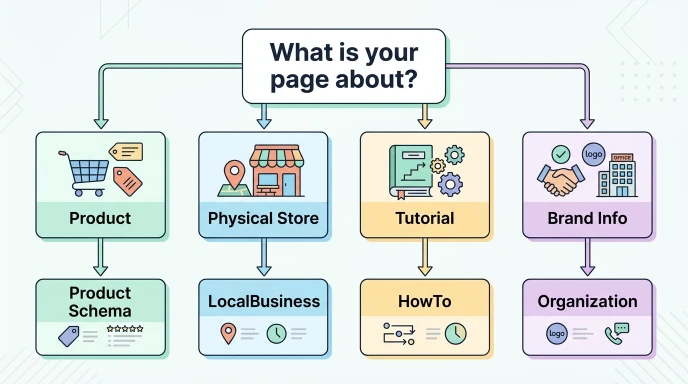
Step 1 — Identify the primary element of the page
What is the page primarily about? A product you sell, a service you offer, an article you wrote, a location you operate from? The primary element determines your main schema type.
Step 2 — Check what competitors are using
Search your target keyword in Google. Look at the top three results. Do they have stars? FAQ dropdowns? Prices? Breadcrumbs? Whatever rich results the top-ranking pages have is a direct signal that Google values that schema type for this query. You need to implement the same types to compete.
Step 3 — Combine schema types where appropriate
Most pages benefit from multiple schema types working together. A product page should have Product schema, AggregateRating schema, and BreadcrumbList schema simultaneously. A blog post should have Article schema and potentially FAQPage schema if it has a Q&A section. This is called “nested schema” and it is standard practice for well-optimized pages.
How to Implement Schema Without Writing Code
You do not need to know JavaScript to implement structured data correctly. The WP Skillz Schema Markup Generator is free, requires no account, and generates valid JSON-LD for all major schema types.
How it works:
- Open the Schema Markup Generator and select your schema type
- Fill in the form fields — name, URL, description, price, questions, etc.
- Click Generate
- Copy the JSON-LD code output
- Paste it into the
<head>section of your WordPress page using a plugin like Insert Headers and Footers, or directly into your theme’s header.php
After implementing, always validate:
Before asking Google to crawl the page, test your code in Google’s Rich Results Test. Enter your URL or paste your code directly. The tool tells you which rich results your page is eligible for and flags any errors or warnings.
Common errors to watch for: missing required fields (image URL for Article schema, price for Product schema), mismatched data (your schema says InStock but your page says sold out), and syntax errors from manual coding (the generator eliminates this risk entirely).
Common Schema Mistakes That Kill Rich Results
Using schema that doesn’t match page content. If your page sells a product but you add FAQ schema without a genuine FAQ section, Google sees deceptive structured data. Your page gets excluded from rich results.
Outdated schema. If your event schema shows a past date, your product schema shows an out-of-stock item as available, or your review count is lower than what the page shows — all of these create data mismatches that reduce trust.
Ignoring warnings in Google Search Console. Warnings are not emergencies, but they represent missed opportunities. A warning means your schema is functional but incomplete. Adding the recommended fields turns warnings into full eligibility. More on monitoring this in our guide to Google Search Console schema monitoring.
Only adding schema to the homepage. Your homepage is rarely the page that needs schema most urgently. Product pages, blog posts, service pages, and FAQ pages benefit far more from structured data.
Schema Markup Implementation Checklist
Run through this for every page you add schema to:
Before implementing:
- Primary content element identified (product, article, service, location)
- Competitor SERP analyzed — rich result types noted
- Correct schema type selected for page content
During implementation:
- All required fields completed
- Data in schema matches visible page content exactly
- Multiple schema types nested where appropriate
After implementing:
- Code validated in Google’s Rich Results Test
- No errors shown — only warnings at most
- “Validate Fix” requested in Google Search Console if fixing existing errors
Ongoing:
- Schema is checked after every WordPress theme update
- Schema checked after every major plugin update
- Google Search Console Enhancement tab is reviewed monthly
Frequently Asked Questions
What are the most important schema markup types for a WordPress blog? Start with Article or BlogPosting schema for your posts, FAQPage schema for posts with Q&A sections, and BreadcrumbList schema for site navigation. These three cover the primary rich result opportunities for blog content.
Can I use multiple schema types on the same page? Yes — and you should. Most pages benefit from nested schema. A product page works best with Product + AggregateRating + BreadcrumbList. A blog post works best with Article + FAQPage (if applicable) + BreadcrumbList. Multiple schema types complement each other.
Does schema markup directly improve rankings? Not directly — Google does not use schema as a direct ranking signal. But it enables rich results, which increase CTR significantly. Higher CTR sends a positive engagement signal to Google, which does influence rankings indirectly over time.
How do I know if my schema is working? Check Google Search Console’s Enhancement tab after a few weeks. It shows which schema types Google has detected on your site, how many pages have errors, warnings, or valid implementations, and which pages are eligible for rich results.
Is the WP Skillz Schema Markup Generator free to use? Yes, completely free with no login required. It supports all major schema types including FAQ, Product, Service, Article, LocalBusiness, Person, Organization, Video, HowTo, Event, and BreadcrumbList.
Conclusion — Start Speaking Google’s Language Today
Schema markup types are not advanced SEO anymore. They are baseline requirements for competitive visibility in 2026. Every major brand, every top-ranking e-commerce store, every high-traffic blog uses structured data — not as a bonus, but as a core part of their SEO stack.
The business owner I mentioned at the start doubled her click-through rate in ten days with twenty minutes of work. No new content. No new backlinks. Just telling Google exactly what her pages were about in a format Google could act on.
Pick your most important page. Identify its primary content type. Open the WP Skillz Schema Markup Generator, generate the correct JSON-LD, validate it, and publish it.
Then check your Search Console in two weeks and watch the green validations appear.
Written by Waseem Aijaz — WordPress Developer & SEO Specialist, WP Skillz All SEO & Marketing Tools | About the Author | Contact