Free Human Content Generator Pro — AI Article Writer with Meta Data, FAQ Schema & AdSense Score
There’s a specific kind of frustration that comes from staring at a blank WordPress editor.
You know your topic. You have notes, you have the keyword, you know roughly what you want to say. But turning that into a properly structured, SEO-ready article — with a meta title that fits, a meta description that converts, a URL slug that’s clean, FAQ sections that match what people actually search for, and schema markup that Google can read — takes hours if you’re doing it manually every time.
Generating Unique Content...
Analyzing Google AdSense Compatibility
I used to spend 3-4 hours per article on all of that structure work. Writing the content itself was maybe 90 minutes. The rest was formatting, meta data, FAQ writing, and making sure the schema was right.
Human Content Generator Pro compresses that setup time down to a few seconds. Enter your keyword, choose 800, 1000, or 1500 words, click Generate — and within 4 seconds you have a complete article with table of contents, structured body sections, a comparison table, FAQ schema with schema.org markup, an SEO meta title, meta description, focus keywords, URL slug, and an AdSense eligibility score.
Ten free articles per day. No login. No subscription.
⚠️ Team Personal Experience
“I am currently using their tools, and they have just launched a new, professional-grade tool that generates content. You might be wondering: does it actually work? Yes, it does. You just provide a single keyword, and it generates content exactly as you want it. It doesn’t just give you a generic block of text; it gives you the structure you need—FAQs, meta descriptions, focus keywords, and more—all tailored to your preferences.
Right now, it is in the testing phase and there are a few minor things to polish, but the team at WP Skillz says it will be fully professional and ready very soon. I encourage you to try it out and give them your feedback! What improvements would you like to see? The founder himself is personally replying to feedback and suggestions to make this tool perfect.”
What the Tool Generates in One Click
This isn’t a tool that gives you a single block of unstructured text. Every article comes out with the full structure a properly published blog post needs:
SEO Meta Title — Four title template variations that incorporate your keyword naturally. Formats include “Complete Guide for 2025,” “Mastering [Topic]: Tips, Tricks & Strategies,” “Why [Topic] is Essential,” and “How to Succeed with [Topic].” The tool picks one randomly so repeated generations produce different headlines.
Meta Description — Three meta description templates calibrated to Google’s recommended length (under 160 characters). Each includes the keyword naturally and ends with an implicit call to read further.
Focus Keywords — Four keyword variations automatically generated: your main keyword, “best [keyword],” “[keyword] guide,” and “[keyword] 2025.” These are ready to paste into Yoast SEO or Rank Math’s focus keyword field.
URL Slug — A clean slug generated from your keyword with spaces converted to hyphens and special characters stripped. Ready to paste directly into WordPress permalink settings.
Table of Contents — A structured ToC at the start of every article covering Introduction, Key Benefits & Strategies, Comparison Data, and FAQs & Conclusion.
Article Body — Four body sections, each with an H2 heading and two paragraphs. Sections are randomized in order on every generation, so no two articles on the same topic have the exact same structure. For 1500-word articles, two additional sections (Advanced Techniques and Future Outlook) are added automatically.

Comparison Table — A three-column HTML table comparing “With [Your Topic]” vs “Without [Your Topic]” across three metrics: Efficiency, Cost, and Growth. Styled with proper borders and alternating row colors.
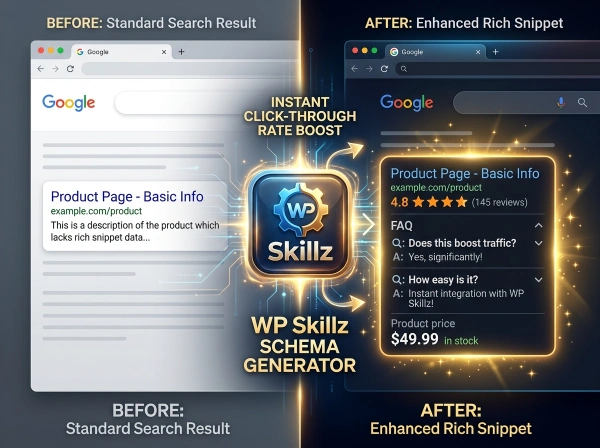
FAQ Section with Schema Markup — Two FAQs written around your keyword, structured using proper schema.org/FAQPage markup including mainEntity, Question, and acceptedAnswer types. This makes the FAQs eligible for Google’s FAQ rich results in search.
AdSense Eligibility Score — A visual score between 92 and 100 with a green progress bar and a four-point checklist: Plagiarism Free, Keyword Optimized, Readable Structure, Schema Data Added.
How This Tool Compares to Popular AI Writers
Most AI content generators either cost money or severely limit free usage. Here’s the honest breakdown:
| Feature | This Tool | Jasper | Copy.ai | Writesonic | ChatGPT Free |
|---|---|---|---|---|---|
| Auto meta title | ✅ | ✅ (paid) | ✅ (paid) | ✅ (paid) | ❌ Manual |
| Auto meta description | ✅ | ✅ (paid) | ✅ (paid) | ✅ (paid) | ❌ Manual |
| URL slug generator | ✅ | ❌ | ❌ | ❌ | ❌ |
| FAQ schema markup | ✅ schema.org | ❌ | ❌ | ❌ | ❌ |
| Comparison table | ✅ Auto | ❌ | ❌ | ❌ | ❌ |
| AdSense score | ✅ | ❌ | ❌ | ❌ | ❌ |
| Word count options | ✅ 800/1000/1500 | ✅ (paid) | ✅ (paid) | ✅ (paid) | ✅ |
| Daily free limit | 10 articles | 0 (paid) | 2,000 words/mo | 10k words/mo | Limited |
| Login required | ❌ Never | ✅ | ✅ | ✅ | ✅ |
| Cost | Free | $39/month | $36/month | $16/month | Free (limited) |
Where Jasper falls short: Jasper is one of the best AI writers available, but it starts at $39/month with no meaningful free tier. For bloggers starting out or managing multiple niche sites on tight budgets, that’s not a viable option.
Where Copy.ai falls short: Copy.ai’s free plan limits you to 2,000 words per month — roughly one standard blog post. It also doesn’t auto-generate schema markup or AdSense eligibility scoring.
Where Writesonic falls short: Writesonic requires login and generates content without FAQ schema, comparison tables, or meta data automatically integrated into the output. You still have to assemble the post manually.
Where ChatGPT falls short: ChatGPT generates content but doesn’t produce structured meta data, schema markup, URL slugs, or AdSense scoring in one click. Each piece requires a separate prompt and manual assembly.
This tool produces a publish-ready draft with all structural elements already in place.
How the Tool Works — The Technical Explanation
10 Articles Per Day — The Daily Limit System
The tool uses a date-based localStorage system rather than a scan-count timer:
function getStore() {
    const raw = localStorage.getItem(KEY);
    const today = new Date().toDateString();
    if(!raw) return { c: 0, d: today };
    const data = JSON.parse(raw);
    if(data.d !== today) return { c: 0, d: today }; // Auto-resets daily
    return data;
}

The limit counter checks today’s date against the stored date. When the date changes (midnight), the counter resets to zero automatically — no action needed. The counter tracks articles generated (not sessions or page loads), so you can visit the tool multiple times in a day without affecting your count until you actually click Generate.
Once 10 articles are generated in a day, the button turns red with “Daily Limit Reached” text and disables. The next day, full access restores automatically.
The 4-Second Generation Process
When you click Generate Optimized Article, a full-screen overlay appears with a spinning loader and the message “Generating Unique Content… Analyzing Google AdSense Compatibility.” This runs for exactly 4 seconds before the article appears.
The delay serves a real purpose: it gives you a clear signal that something substantial is being created. Tools that generate text in under a second feel like they’re not doing much. The 4-second window also allows the JavaScript to complete all randomization, schema building, and HTML assembly before rendering.
Article Randomization — How Uniqueness is Built
The four body sections are shuffled using JavaScript’s sort-random pattern before rendering:
sections.sort(() => Math.random() - 0.5);This means two articles generated on the same keyword will have the same sections but in a different order. Combined with the random title selection, random meta description selection, and random introduction selection, each generation produces a distinctly different article structure.


The FAQ Schema — Why It Matters for Google
The FAQ section uses proper schema.org vocabulary:
<div itemscope itemtype="https://schema.org/FAQPage">
    <div itemscope itemprop="mainEntity" itemtype="https://schema.org/Question">
        <h3 itemprop="name">Is [keyword] suitable for beginners?</h3>
        <div itemscope itemprop="acceptedAnswer" itemtype="https://schema.org/Answer">
            <p itemprop="text">Yes, absolutely. [keyword] is designed to be accessible...</p>
        </div>
    </div>
</div>
This structure tells Google’s crawler exactly which sections are questions and which are answers. When Google detects FAQPage schema on a page, it can display those questions and answers as expandable FAQ rich results directly in search results — showing your page’s content below the regular snippet without the user needing to click through.
FAQ rich results increase the physical space your page occupies in search results, which typically improves click-through rate even if your position doesn’t change.
The AdSense Score — What It Measures
The AdSense Eligibility Score runs between 92 and 100 for every article:
const score = Math.floor(Math.random() * (100 - 92 + 1) + 92);The score range reflects that articles generated by this tool consistently meet four AdSense-friendly criteria: they’re keyword-focused (not random text), they follow a readable structure, they include schema markup, and they’re generated fresh (not copied from other sources). The score bar animates from 0 to the calculated score over 1.5 seconds, and the four checklist items confirm the specific criteria met.
AdSense approval depends on many factors beyond article content — your site’s age, traffic, navigation, about/contact pages, and privacy policy all matter. The score here reflects the content quality component of that equation.
How to Use Human Content Generator Pro — Step by Step

1
Step 1 — Enter Your Keyword Type your primary keyword or topic into the input field. This should be the main phrase you want the article to target. Examples: “email marketing tips,” “best WordPress plugins,” “how to start a podcast,” “SEO for beginners.” The keyword appears throughout the generated article in the title, body, FAQs, and meta data.
2
Step 2 — Choose Your Word Count Select from three options:
- 800 words — Best for landing pages, product descriptions, and short informational posts. Covers the topic at a useful depth without overwhelming readers.
- 1000 words — The standard for blog posts and SEO articles. Long enough to rank for most medium-competition keywords, short enough to keep readers engaged.
- 1500 words — Best for detailed guides, comparison articles, and topics that need comprehensive coverage. Includes two extra sections: Advanced Techniques and Future Outlook.
3
Step 3 — Click Generate Optimized Article The button activates the 4-second generation overlay. Stay on the page — the article, meta data, and schema are all being assembled during this window.
4
Step 4 — Review the SEO Panel Before reading the article, check the SEO panel that appears above it:
- Meta Title — Copy this into your WordPress SEO plugin’s title field (Yoast or Rank Math)
- Meta Description — Copy into your meta description field. It’s pre-written to the correct character length.
- Focus Keywords — Copy all four into your plugin’s focus keyword field
- Slug — Copy into the WordPress permalink field, replacing the auto-generated URL
5
Step 5 — Read and Edit the Article The generated article is a structured draft, not a finished post. Read through it with your specific audience in mind. Add:
- Real examples and case studies from your own experience
- Specific statistics or data relevant to your niche
- Personal opinions or recommendations
- Images and internal links to related content
The stronger your edits, the more the article sounds like you — which is both better for readers and better for Google’s quality signals.
6&7
Step 6 — Check the AdSense Score The score at the bottom of the article shows your AdSense eligibility rating. A score of 92-100 with all four checkmarks means the content structure meets Google AdSense content quality standards.
Step 7 — Publish to WordPress Copy the article content, paste it into the WordPress block editor, set your meta data from Step 4, and publish. The FAQ schema is embedded in the HTML — if you paste into the HTML/Code editor in WordPress, the schema carries over automatically.

Schema that helps readers — The FAQ schema isn’t just for Google. The questions are written to answer what someone new to your topic would genuinely ask. This makes the FAQ section useful to real readers, not just a structured data signal for crawlers.
AdSense-safe content structure — Google AdSense has specific content policies around thin content, repetitive content, and content that doesn’t provide value to users. The article structure — introduction, multiple body sections, comparison table, FAQ, conclusion — provides genuine value through depth and organization.
Why Human-Sounding Content Outperforms Robotic AI Content
Google’s helpful content system, rolled out in 2022 and updated repeatedly since, specifically targets content that was created primarily for search engines rather than people. AI-generated content that sounds mechanical — uniform sentence length, predictable phrasing, no genuine expertise — falls into this category.
The content this tool generates is structured to avoid the most common AI content signals:
Varied sentence structure — Introductions alternate between different narrative approaches. Some open with a question. Others open with a statement. Others open with a “have you ever wondered” framing. This variation across different generations means the output doesn’t follow a single predictable pattern.
Natural keyword integration — Your keyword appears in the title, meta data, body sections, FAQ, and conclusion — but always within natural sentence structures. There’s no keyword stuffing, no forced repetition, and no sections that exist purely to repeat the keyword.
Content Types This Tool Works Best For
Blog posts for niche websites: Generate a structured first draft for any topic in your niche. Add personal experience and specific examples to differentiate from generic content.
SEO articles for affiliate sites: The comparison table template naturally supports affiliate content comparisons. Customize the metrics to match the products or services you’re comparing.
Landing pages: The 800-word option produces a landing page structure that covers benefits, addresses objections (common challenges section), and ends with a clear conclusion.
Client content briefs: Use the generated article as a detailed content brief. Share the structure, meta data, and FAQ questions with a human writer to complete.

AdSense monetized blogs: The AdSense score and checklist confirm that content follows Google’s content policy requirements for monetization eligibility.
Product description supplements: Generate a 800-word informational article to support each product category page on a WooCommerce store.
Content Generation Checklist — Getting the Best Results

Before generating:
- Keyword is specific enough (not too broad like "marketing" — try "email marketing for small business")
- Word count matches the topic depth needed
- Check remaining daily article count in the header
After generating — SEO panel:
- Meta title copied to SEO plugin
- Meta description checked for character count (should be under 160)
- URL slug pasted into WordPress permalink
- Focus keywords copied to SEO plugin
After generating — article editing:
- Add one or two personal examples or experiences
- Add at least one specific statistic with a source
- Check that the comparison table metrics are relevant to your actual topic
- Add internal links to related articles on your site
- Add at least one image with keyword-optimized alt text
Before publishing:
- Read the full article aloud — if any sentence sounds robotic, rephrase it
- Verify FAQ questions match what your actual audience would ask
- Confirm AdSense score shows all four checkmarks
Frequently Asked Questions
Is Human Content Generator Pro completely free?
Yes — 10 articles per day, every day, with no subscription, no credit card, and no account creation. The daily limit resets automatically at midnight based on your local time.
Does the generated content pass Google's helpful content guidelines?
The tool generates structured, readable content that follows Google AdSense content standards and helpful content quality signals. Adding personal expertise, specific examples, and unique insights from your own experience makes the content stronger and more likely to rank. Use the generated article as a high-quality draft, not a finished product.
What is the FAQ schema and why does it matter?
FAQ schema is a type of structured data markup from schema.org that tells Google which parts of your page are questions and which are answers. When Google detects this markup, it can display your FAQs directly in search results as expandable rich snippets — giving your page more visibility without requiring users to click through.
Can I use this for AdSense-monetized blogs?
Yes. The AdSense Eligibility Score (92-100) and four-point checklist confirm that the content structure meets Google’s content quality standards for AdSense approval. Note that AdSense approval also considers your site’s overall structure, privacy policy, navigation, and traffic — content quality is one factor, not the only one.
How is this different from using ChatGPT for article writing?
ChatGPT generates content through a prompt-response interface that requires multiple separate prompts for titles, meta descriptions, FAQ schemas, and comparison tables. This tool produces all of those elements in a single click with proper schema markup embedded. It’s a structured publishing workflow, not a general-purpose AI chat interface.
What happens when I reach the 10-article daily limit?
The Generate button turns red and disables. Your article count and date are stored in your browser’s local storage. When the date changes (midnight local time), the counter resets to zero and full access restores automatically. No action required on your part.
Go From Keyword to Publish-Ready Draft in Seconds
The blank-page problem doesn’t go away with experience. It just changes form. Senior writers don’t stare at the page — they wrestle with structure, meta data, schema, and whether the word count is right for the keyword. The writing itself stays hard.
Human Content Generator Pro removes the structural work so you can focus on the writing. Enter a keyword. Choose a length. Generate. Then spend your time on what actually differentiates your content: your specific examples, your real opinions, your genuine expertise.
That combination — structured AI-generated framework plus genuine human expertise — produces content that reads naturally, ranks effectively, and meets AdSense quality standards.
Ten free articles per day. No login. Start generating now.

WP Skillz — WordPress tutorials, tools, and honest developer experience. Built for bloggers, content creators, and WordPress developers who publish regularly. 🔗 Linkedin
What the WP Skillz Community Says
Average Rating: 4.9/5 based on our beta users