

WordPress SEO & Digital Marketing
Are you looking for digital marketing tools for your WordPress website but finding yourself constantly jumping from one website to another? Stop right there! This website has the exact solution to your problem. Just scroll down to find everything you need.






✓ All tools loaded
Free WordPress SEO & Digital Marketing Tools — The Complete Toolkit for Bloggers, Developers & Agencies
I’ve been building WordPress sites professionally since 2014. Over that time, I’ve watched the digital marketing tool landscape change completely — tools that used to cost hundreds of dollars a month are now either free or have free alternatives that do the job just as well.
The problem isn’t a shortage of tools. There are too many. What most bloggers, small business owners, and even agencies actually need is a focused set of tools that solve the real problems: is my content readable, is it original, does it contain the right schema markup, is it being flagged as AI-generated, and are my images and keywords ready for publishing?
Every tool in this category was built to answer one of those questions — directly, without a login wall, without a subscription, and without making you wait.

This is the WP Skillz WordPress SEO & Digital Marketing toolkit. Seven free tools. One page. Everything you need to write, optimize, and publish content that ranks.

These aren’t optional steps — they’re the difference between content that ranks on page one and content that sits on page five where nobody looks.
Every tool in this category addresses one specific step in that workflow. Together they form a complete, free digital marketing stack for WordPress professionals.
What Is WordPress SEO & Why Every Site Owner Needs These Tools
Search engine optimization for WordPress isn’t just about installing Yoast and calling it done. Real WordPress SEO involves a chain of decisions that starts before you write a single word and continues after you hit publish.
Before writing: What keywords should you target? What’s the search intent behind those terms? Which semantic variations should appear naturally in the content?
During writing: Is the reading level appropriate for your audience? Is the content long enough to compete? Is it structured with proper headings? Does it contain FAQs that match what people actually ask Google?
After writing: Does your page have the right schema markup for rich results? Is your content passing AI detection checks before submission? Are your images optimized and background-removed for product pages?
After publishing: Are you tracking the right metrics? Is your content scoring well on SEO analysis tools?
How to Use These Tools Together — The Complete WordPress SEO Workflow
These tools are designed to work in sequence, not in isolation. Here’s the complete workflow most WP Skillz users follow from idea to published post:

1
Step 1 — Keyword Research (Semantic Keyword Generator) Start with your topic. Enter a seed keyword into the Semantic Keyword Generator. Use the A-Z expansion and intent filter to find 20-30 candidate keywords. Note the ones with low difficulty (below 40 KD, green color) and decent volume (200+ monthly searches). Use the detail modal to get the LSI keyword and recommended word count for each.
2
Step 2 — Content Generation (Human Content Generator Pro) Take your chosen primary keyword into the Human Content Generator. Select the word count that matches the recommendation from Step 1. Generate your base article structure. Copy the meta title, meta description, URL slug, and focus keywords immediately — you’ll need these in Yoast or Rank Math.
3
Step 3 — Content Analysis (SEO Content Analyzer) Paste your draft (after adding personal examples and expertise) into the SEO Content Analyzer. Check your word count matches the target. Run the AI scan — aim for 70%+ human probability and 80+ SEO quality score. If AI probability is high, vary your sentence lengths and add more personal voice.
4
Step 4 — AI Detection Check (AI Detector) For content going to academic submissions, client deliveries, or premium publications, run a separate AI detection scan with the AI Detector for the full plagiarism estimate and grammar count alongside the AI probability.
5
Step 5 — Grammar Check (AI Rewrite Content Tool) If the grammar count from Step 4 was high, or you want a final polish before publishing, paste the content into the AI Rewrite Content Tool for grammar and readability improvements.
6
Step 6 — Image Preparation (Image Background Remover) For product images, featured images, or any graphic that needs a transparent background, use the Image Background Remover. Use the slider for automatic removal, the brush for fine detail work, and download as PNG for transparent or JPG for white background.
7
Step 7 — Schema Markup (Schema Markup Generator) Before publishing, add the right schema for your page type. FAQ schema for informational posts. Product schema for WooCommerce pages. LocalBusiness schema if you have a physical location. Article schema for news and blog posts. Copy the JSON-LD code and paste into your WordPress footer or use a plugin like Insert Headers and Footers.
8
Step 8 — Publish Your content is now keyword-researched, structured, AI-checked, grammar-polished, image-optimized, and schema-marked. Publish in WordPress with the meta data from Step 2 in your SEO plugin.
Why Free Tools Can Replace $500/Month Tool Stacks for Most WordPress Sites
There’s a persistent belief in the WordPress SEO community that you need Semrush, Jasper, Clearscope, and TinyPNG running simultaneously to compete. That might be true for large enterprise sites with dedicated content teams and six-figure SEO budgets.
For most WordPress sites — blogs, niche sites, local business sites, small e-commerce stores, agency demos, personal brands — the critical tasks are simpler. You need to find the right keywords. Write content at the right length. Check it reads well. Add schema. Verify it’s not flagged as AI. Optimize images. That’s it.
Semrush costs $165/month for the entry-level plan. Jasper costs $39/month. Clearscope costs $170/month. TinyPNG costs $25/month for unlimited use. That’s $399/month — nearly $5,000 per year — for tasks that these free tools handle effectively.
The gap between paid and free tools matters most at scale — when you’re managing 500+ pages, dozens of client accounts, and need enterprise-level data accuracy. For individual site owners, bloggers, and small agencies managing 5-20 client sites, free tools that do the job are just as effective.

This toolkit exists because most WordPress site owners don’t need to spend $5,000 per year to rank. They need to execute consistently on the fundamentals — keyword research, content structure, schema markup, image optimization, and content quality checks. All of that is here, free.
Digital Marketing Tools Comparison — Paid vs Free
| Task | Paid Tool | Monthly Cost | Free Alternative Here | Quality Gap |
|---|---|---|---|---|
| Keyword research | Semrush | $165 | Semantic Keyword Generator | Moderate (volume estimates vs exact data) |
| Content generation | Jasper | $39 | Human Content Generator | Low for basic drafts |
| AI detection | Winston AI | $18 | AI Detector | Low for standard checks |
| Schema markup | Merkle Schema Tool | Free but limited | Schema Markup Generator | None |
| Image background removal | Remove.bg | $9/month | Image Background Remover | Low (client-side precision) |
| Content analysis | Surfer SEO | $79 | SEO Content Analyzer | Moderate (real-time SERP data vs length analysis) |
| Grammar check | Grammarly | $12 | AI Rewrite Content Tool | Moderate (depth of suggestions) |
What's Coming Next to This Toolkit
The WordPress SEO & Digital Marketing toolkit is growing. Tools currently in development for this category include:
Coming Soon:
- SERP Position Tracker — monitor keyword rankings for your WordPress site over time
- Meta Tag Generator — create optimized title tags and meta descriptions with character counter
- Internal Link Suggester — analyze your content and suggest internal linking opportunities
- Page Speed Analyzer — audit WordPress page speed with improvement recommendations
- Local SEO Schema Generator — LocalBusiness and Service schema with full address and hours support
Each new tool follows the same principles as the existing seven: free, no login, no limits that force an upgrade, and genuinely useful for WordPress site owners working at any scale.
Benefits Summary — Why WP Skillz Tools Work for WordPress SEO
Completely free: No credit card. No trial period that converts to a charge. No “free plan” that hides the useful features behind a paywall. Every feature in every tool is accessible without payment.
No login required: Create an account if you want to save preferences — but every tool runs fully without one. Open the tool, use it, close the tab. No data stored, no account created.
Client-side where possible: Tools like the Image Background Remover and SEO Content Analyzer process everything in your browser. Your content and images never reach our servers. This matters for client confidentiality and sensitive content.
WordPress-specific: Every tool was built by WordPress developers for WordPress workflows. The schema types supported are specifically those Google uses for WordPress site rich results. The content analysis targets the word counts and structure that rank for typical WordPress blog post topics.
No daily limits that block professional use: Where limits exist (10 scans/day for AI detection, 10 articles/day for content generation), they’re generous enough for active daily use. They exist to prevent automated scraping, not to push you toward an upgrade.
Frequently Asked Questions (FAQs)
What are the best local SEO tools for a small business WordPress site?
For local SEO on WordPress, the most impactful free tools are the Schema Markup Generator (add LocalBusiness and Service schema for map pack visibility), the Semantic Keyword Generator (find location-specific long tail keywords), and the SEO Content Analyzer (verify your local service pages are long enough and well-structured). These three together address the core local SEO on-page factors.
What are the 5 most important digital marketing tools for WordPress?
or most WordPress site owners, the five essential tools are: a keyword research tool (Semantic Keyword Generator), a content structure tool (Human Content Generator), a schema markup generator, an image optimizer (Image Background Remover), and a content quality checker (SEO Content Analyzer). These cover the full content-to-publish workflow without needing paid subscriptions.
Is SEO dead or evolving in 2026?
SEO is evolving, not dying. Google’s AI Overviews, ChatGPT search integration, and Perplexity are changing where traffic goes — but they’re not eliminating the need for well-optimized content. In fact, schema markup matters more in an AI search environment because AI models use structured data to identify authoritative content to cite. FAQ schema and proper content structure are more valuable now than they were in 2020.
What are the free SEO tools best for beginners?
Start with the Schema Markup Generator (no coding knowledge needed), the Semantic Keyword Generator (no SEO expertise required to use the results), and the SEO Content Analyzer (paste and scan — no configuration). These three tools provide immediate value without requiring any background in technical SEO.
Can AI tools replace a digital marketing agency?
Not entirely — but they can significantly reduce how much agency support you need. AI tools handle the repeatable, systematic parts of SEO work: keyword research, content structure, schema generation, image optimization, and content quality checks. What agencies provide that tools don’t is strategic judgment, competitor analysis context, and relationship-based link building. For small businesses and independent bloggers, free AI tools cover 70-80% of the work.
How do these tools help with Google AdSense approval?
The Human Content Generator Pro includes an AdSense Eligibility Score (92-100) and checks for plagiarism-free status, keyword optimization, readable structure, and schema data — the four main content quality factors Google evaluates for AdSense. The AI Detector verifies content reads as human-written. Together they help prepare content that meets Google’s content quality requirements for monetization.
The Tools — What Each One Does
🖼️ Image Background Remover
What it does: Upload any image (JPG, PNG, WebP, BMP, GIF) and use a live strength slider to automatically remove the background. Fine-tune with a manual brush — Erase mode removes specific areas, Restore mode brings back areas removed by mistake. Download as transparent PNG, compressed WebP, white-background JPG, or GIF.
Who it’s for: WooCommerce store owners removing backgrounds from product photos, bloggers creating clean featured images, WordPress developers preparing client images before upload, freelancers creating logo variations for clients, and content creators making social media graphics.
Why it matters for WordPress SEO: Image optimization directly affects Core Web Vitals. Clean, properly formatted product images with transparent backgrounds reduce file sizes, enable consistent presentation against any background, and look more professional in search image results. Google Image Search prioritizes clear, high-quality images.
Key features: Live strength slider for auto-removal, manual Erase + Restore brush with adjustable size, real-time Canvas API processing (fully client-side — no server upload), multi-format download (PNG/WebP/JPG/GIF), SVG upload support (downloads as original vector), 100% browser-side privacy — images never leave your device.
🔍 AI Detector + Plagiarism Checker
What it does: Paste any text and get an AI probability score, human confidence percentage, plagiarism estimate, and grammar issue count in a single 10-second scan. The tool uses lexical density analysis and burstiness measurement to detect whether content follows AI writing patterns.
Who it’s for: Students checking assignments before submission, content writers verifying work before client delivery, bloggers ensuring their content passes AI detection, teachers checking student submissions, and SEO professionals making sure their articles meet Google’s helpful content standards.
Why it matters for WordPress SEO: Google’s helpful content system targets content that appears to be created primarily for search engines rather than people. AI-generated content that scores high on detection tools may receive reduced rankings. Running a pre-publish check catches this before it becomes a traffic problem.
Key features: Dual chart output (Human vs AI doughnut + SEO Quality bar chart), 10 scans per day with automatic 24-hour reset, no login required, grammar issue count alongside AI probability.
✏️ Free AI Rewrite Content Tool | Grammar Checker Online
What it does: Paste content and get suggestions for improving grammar, readability, sentence structure, and tone. The tool identifies weak phrases, passive constructions, overly complex sentences, and common grammatical errors — then suggests natural human-sounding rewrites.
Who it’s for: Non-native English speakers writing content for international audiences, content writers who want a fast grammar pass before submission, bloggers who write quickly and revise later, and WordPress site owners managing their own content without an editor.
Why it matters for WordPress SEO: Poor grammar is one of the clearest readability signals that reduces time-on-page. Google’s quality raters evaluate content quality as part of the helpful content assessment. Content with consistent grammar errors signals lower quality regardless of keyword optimization.
Key features: Grammar check, readability improvement suggestions, sentence rewriting, tone analysis, online free with no download or installation required.
🏗️ Schema Markup Generator
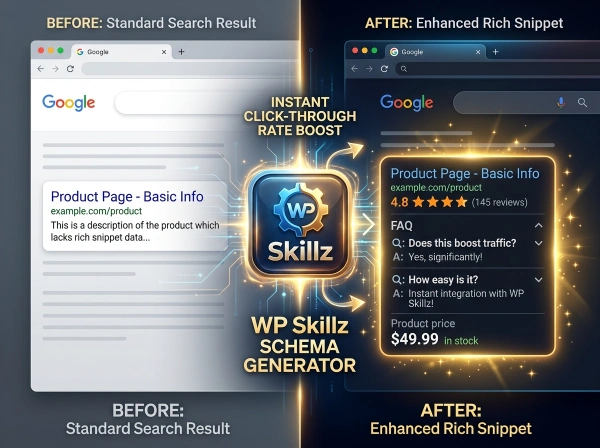
What it does: Select a schema type and fill in your details — the tool generates ready-to-paste JSON-LD structured data markup. Supports all major schema types used by Google for rich results: FAQ, Service, Product, Person, Organization, Article, LocalBusiness, Video, HowTo, SoftwareApplication, Event, BreadcrumbList, and Review. Copy the code with one click. Validate directly in Google’s Rich Results Test.
Who it’s for: WordPress developers adding structured data to client sites, bloggers adding FAQ schema for rich result eligibility, local business owners adding LocalBusiness schema for map pack visibility, e-commerce stores adding Product schema for shopping rich results, and any WordPress site owner who wants to improve how their pages appear in Google search.
Why it matters for WordPress SEO: Schema markup is the most underutilized on-page SEO technique for most small and medium WordPress sites. Large publications and enterprise sites use it consistently. Independent bloggers and small businesses rarely do. This creates an opportunity — properly implemented schema markup can earn FAQ rich results, star rating displays, site navigation links, and product price badges directly in search results, all without changing your ranking position.
Key features: 13+ schema types supported, JSON-LD format (Google’s recommended format), one-click copy, direct link to Google’s Rich Results Test and Schema Markup Validator, no login required, free unlimited use.
💡 Free Semantic Keyword Idea Generator
What it does: Enter a seed keyword and get up to 100 related keyword ideas pulled from Google’s autocomplete API — complete with estimated search volume, keyword difficulty percentage, CPC data, and search intent classification (Informational, Transactional, Commercial). Includes A-Z expansion mode that appends every letter of the alphabet to uncover long tail variations.
Who it’s for: Bloggers building content calendars, SEO professionals doing keyword research without a Semrush or Ahrefs subscription, content writers identifying related topics to cover in a single article, and local businesses finding location-specific keywords.
Why it matters for WordPress SEO: Modern Google understands topics, not just keywords. Content that covers a topic’s full semantic range — the related questions, variations, and subtopics that searchers explore — ranks better than content that repeats a single keyword 15 times. This tool finds those semantic variations automatically.
Key features: Real Google autocomplete data, 4 region filters (US, UK, India, Pakistan), intent filter (all/informational/transactional/commercial), A-Z expansion, keyword detail modal with LSI keyword suggestion and word count recommendation, CSV and PDF export, Copy All button.
📊 SEO Content Analyzer | Word & Character Counter
What it does: Paste your content and get a live word count, character count, and reading time as you type. Click Start AI Analysis for a 10-second deep scan that produces: an AI probability score, human confidence percentage, SEO quality score (based on content length), and readability score — displayed as dual charts (doughnut for Human vs AI, bar for SEO Quality and Readability).
Who it’s for: Content writers checking word count and character limits before publishing, bloggers verifying content is long enough for SEO targets, social media managers checking character limits for Twitter/LinkedIn/YouTube, students checking essay length and readability level, and anyone who needs a combined word counter and SEO quality check in one place.
Why it matters for WordPress SEO: Word count correlates with ranking performance for most informational content. Pages below 800 words rarely rank for competitive keywords. Pages above 1,200 words with proper structure consistently outperform thin content. The character counter prevents the most common meta data mistake — titles and descriptions that truncate in search results. The AI scan catches content that might be flagged before publishing.
Key features: Live word, character, and reading time counter, AI probability + human confidence dual-chart output, SEO quality score formula based on content length, readability scoring, 10 free daily scans with 24-hour auto-reset, no login required.
Your Free WordPress SEO Toolkit Starts Here
Most WordPress site owners spend too much time trying to figure out which tools to use instead of actually using them. The research phase becomes the obstacle.
This page removes that obstacle. Seven tools. One category. Every tool free, every tool immediately usable, every tool built specifically for WordPress SEO and digital marketing workflows.
Start with the tool that solves your most immediate problem. If you’re not ranking, start with the Semantic Keyword Generator. If your content isn’t converting, start with the SEO Content Analyzer. If your WordPress pages aren’t showing rich results in Google, start with the Schema Markup Generator.
Each tool links to detailed documentation explaining exactly how it works, what the results mean, and how to act on them.
The toolkit grows regularly. Check back for new tools as they’re added to this category.
WP Skillz — WordPress tutorials, tools, and honest developer experience. Built by WordPress professionals who use these tools in real client projects. 🔗 Linkedin
What the WP Skillz Community Says
Average Rating: 4.9/5 based on our beta users