“I am genuinely so happy to see that there is a developer out there who actually thinks about the needs of fellow developers. Speaking from my own experience, the Technology Checker Tool introduced by the WP Skillz team is truly next-level.
All this tool requires is a website URL, and it instantly brings all the underlying data right in front of you. If you are a developer, you can inspect the exact technical architecture—you can see which tools they used, what theme is active, which specific plugins or page builders are running, and the exact platform hosting the site. Honestly, this tool is an absolute masterpiece from the WP Skillz team!”
A client came to me last year, genuinely frustrated.
His competitor in the local legal services niche had been outranking him for eight months. Same city, similar content quality, similar backlink count. But the competitor’s site loaded in 1.2 seconds on mobile. His loaded in 4.8 seconds.
The competitor was not smarter or luckier. They were using better tools — specifically a performance stack that included LiteSpeed Cache, a lightweight Astra theme, and Cloudflare as a CDN. My client was running a bloated page builder with no caching plugin at all.
Twenty minutes after identifying that gap using a website technology detector, we had a clear action plan. Within six weeks of fixing the performance stack, his mobile load time dropped to 1.6 seconds, and his ranking moved from position nine to position three.
That is the practical value of knowing how to check the technology stack of a website. It turns “why are they beating me?” into a specific, fixable answer.
Why Tech Stack Analysis Matters Beyond Just Curiosity
Most SEO guides focus entirely on keywords and backlinks. Both matter. But the technology stack is the layer underneath that determines whether your keyword optimization and backlink work actually translates into rankings.
Google’s Core Web Vitals — LCP (Largest Contentful Paint), CLS (Cumulative Layout Shift), and INP (Interaction to Next Paint) — are direct ranking signals. Every one of them is influenced by the technology choices a site makes. The caching plugin, the image format, the CDN provider, and the theme’s code quality — these technical decisions determine your Core Web Vitals scores before you write a single word of content.
When a competitor consistently outranks you in a niche where content quality is comparable, the answer is usually in their tech stack, not their keyword strategy.
Three specific things you learn from a tech stack analysis:
What is making their site fast? If you see Cloudflare, LiteSpeed, or WP Rocket in their stack, you know exactly why their LCP scores are strong. Match or beat that infrastructure.
What functionality have they built? Social proof plugins, advanced schema plugins, heat mapping tools, A/B testing services — these all show in the technology fingerprint. If they have conversion optimization tools running that you do not, that explains performance differences beyond just rankings.
Where they are vulnerable. Outdated plugin versions, unprotected admin paths, and missing security headers — a competitor’s technology report sometimes reveals weaknesses you can document and avoid in your own setup.
Method 1 — The Fast Way: WP Skillz Website Technology Detector
The WP Skillz Website Technology Detector is the fastest method and requires zero technical knowledge. No installation, no account, no payment.
How to use it:
- Copy the URL of any website you want to analyze
- Paste it into the detector tool
- Click Scan
- Results appear in under two seconds
What the report shows:
- CMS identification (WordPress, Shopify, Wix, custom build)
- WordPress theme — both parent theme and child theme if one is active
- Active plugins detected through HTML fingerprinting
- Security headers and SSL status
- IP address and hosting provider
- RDAP domain expiry data
- Screenshot preview via Mshots API
The HTML fingerprinting method works by analyzing the public-facing source code of the page — the same code any browser receives when visiting a site. WordPress sites leave characteristic patterns: /wp-content/themes/ path structures, specific meta tags from SEO plugins, script signatures from page builders. The detector recognizes these patterns and maps them to known technologies.
This is completely legal. You are reading publicly available information that every browser already receives. The detector simply makes it readable without requiring you to parse raw HTML yourself.

Method 2 — The Manual “View Source” Method
If you prefer to verify what the detector found, or if you are working on a site that uses obfuscation techniques, the manual method gives you direct access to the raw technology signatures.
Steps:
- Visit the target website in any browser
- Right-click anywhere on the page and select “View Page Source” (or press Ctrl + U on Windows, Cmd + Option + U on Mac)
- Press Ctrl + F to open the search function
- Search for
wp-content/themes/— The text immediately following this path is the theme folder name - Search for
wp-content/plugins/— This reveals active plugins referenced in the page source
What this reveals:
For WordPress sites, the theme name, version numbers (sometimes), and which plugins are loading JavaScript or CSS files on the front end. Not all plugins appear in page source — only those that load assets on the public side. Backend-only plugins like database managers or security monitors are invisible this way.
Limitations:
Some WordPress developers use security plugins that remove or rename the /wp-content/ paths. Custom-coded sites using frameworks like React, Next.js, or Laravel show no WordPress signatures at all. For these cases, the automated detector is more reliable because it checks multiple fingerprinting methods simultaneously rather than relying on a single path pattern.
Method 3 — Browser Extensions (Use With Caution)
Wappalyzer and similar browser extensions detect technology stacks as you browse. The extension reads the page you are visiting and displays a pop-up showing detected technologies.
Advantage: Passive detection — you learn a site’s stack just by visiting it without actively running a scan.
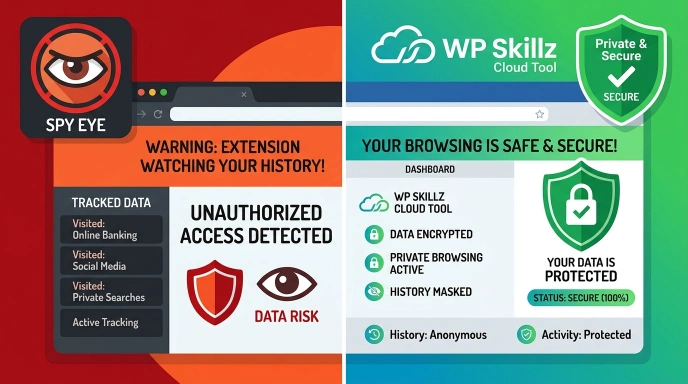
Disadvantage: Browser extensions have access to your full browsing history and the content of pages you visit. Several popular technology detection extensions have been sold to data aggregators. Your browsing data — including competitor research sessions — can become a product.
For most professional use cases, a cloud-based tool that you actively query is safer than an extension that passively reads everything you visit.
Competitor Tech Stack Analysis — What to Look For
Running the scan is the easy part. Reading the results strategically is where most people leave value on the table.
Theme and page builder: A heavy page builder like Divi or WPBakery adds significant JavaScript weight to every page. If a fast-ranking competitor is using a lightweight theme like Astra or GeneratePress without a heavy builder, that is a direct performance advantage you can replicate by changing your own setup.
Caching and CDN: LiteSpeed Cache, WP Rocket, or W3 Total Cache combined with Cloudflare CDN is a common high-performance stack. If you see this on a competitor and your site has no caching plugin, the performance gap is preventable.
SEO plugin: Knowing whether a competitor uses Yoast or Rank Math tells you how their schema markup is likely generated. If they are using Rank Math and you see FAQ rich results in their SERP listing but not yours, the schema generation is the difference — both tools have FAQ schema support, but the configuration differs.
Security headers: Check for Content Security Policy headers, X-Frame-Options, and HSTS in the security section of the report. Missing security headers is a real vulnerability you can avoid on your own site by seeing what comprehensive security looks like.
Analytics and tracking: Google Analytics 4, Hotjar, Microsoft Clarity — if you see heat mapping and session recording tools on a competitor’s site, they are actively optimizing their conversion funnel based on user behavior data. That level of ongoing optimization is harder to match without similar tools.
Comparison: Free vs Paid Technology Detection Tools
| Feature | WP Skillz Detector | BuiltWith Pro | Wappalyzer |
|---|---|---|---|
| Price | Free forever | $295/month | Limited free tier |
| Domain expiry data | ✅ Included | ❌ Not standard | ❌ Not available |
| Plugin detection | ✅ Yes | ✅ Yes | ✅ Partial |
| SSL and security headers | ✅ Yes | ✅ Yes | ✅ Partial |
| Login required | ❌ Never | ✅ Required | ✅ Required |
| Browser extension needed | ❌ No | ❌ No | ✅ Required |
| Privacy | No tracking | Tracks queries | Tracks browsing |
For freelancers, small agencies, and independent WordPress developers, the WP Skillz detector covers the core use cases without the subscription cost or privacy tradeoffs.
Auditing Your Own Site — An Overlooked Use Case
Most people use technology detectors only for competitor research. Running the scan on your own site reveals something different and often more valuable: what information you are accidentally exposing.
Some things that appear in your own technology report that you may not want visible:
- Exact plugin names and versions — outdated plugin versions are publicly searchable in vulnerability databases, and knowing your version is visible to anyone tells you whether you are advertising a known exploit
- Admin path exposure — some security plugins protect
/wp-admin/But miss other common paths - Hosting provider — sometimes useful for competitors doing infrastructure research
Run the Website Technology Detector on your own site. Then check the results against your actual security configuration. If you see things you did not intend to expose, that is a real audit finding worth addressing.
Also, pair this with the Website Malware Scanner for a complete security picture — the technology detector shows your stack, and the malware scanner checks the actual security of what is running on it.
Tech Stack Audit Checklist
Run through this when analyzing any website — competitor or your own:
Performance stack:
- Caching plugin identified (WP Rocket, LiteSpeed, W3 Total Cache)
- CDN provider identified (Cloudflare, BunnyCDN, StackPath)
- Theme type identified (lightweight framework vs heavy builder)
- Page builder identified and compared to your own setup
SEO configuration:
- SEO plugin identified (Yoast, Rank Math, SEOPress)
- The schema plugin is identified if separate from the main SEO plugin
- Check SERP for rich results — correlate with schema tools in the report
Security:
- SSL certificate is active and valid
- Security headers present
- Domain expiry date checked — see Domain Name Finder
Analytics:
- Analytics platform identified
- Heat mapping or session recording tools present
- A/B testing platform identified
Frequently Asked Questions
Is checking a competitor’s technology stack legal? Yes. You are reading publicly available page source code — the same information any browser receives when visiting a site. No login credentials are used, no private data is accessed. It is standard competitive research practice.
Why does the detector sometimes show “Custom Code” instead of a platform name? Sites built from scratch using React, Next.js, Vue.js, or plain HTML/CSS do not leave the characteristic fingerprints of standard platforms like WordPress or Shopify. “Custom Code” means the developer wrote the site without a recognized CMS, common for developer portfolios and tech startups.
How often should I audit competitor tech stacks? Every quarter is a reasonable cadence for active competitive research. Run an immediate check any time a competitor makes a significant performance improvement — fast ranking movement often corresponds with a tech stack upgrade.
Can I hide my WordPress theme from this type of detector? Partially. Security plugins can remove some path signatures and version numbers. But complete obfuscation is difficult because multiple fingerprinting methods exist beyond just file paths. Focus on keeping plugins updated rather than hiding your stack — security through obscurity is not a reliable strategy.
Does this work for non-WordPress sites? Yes. The detector identifies Shopify, Wix, Webflow, Squarespace, Joomla, Drupal, and custom-coded sites in addition to WordPress.
Conclusion — Stop Guessing, Start Analyzing
My client from the opening story did not need to guess why he was losing. The technology gap was visible in a two-second scan. The fix was straightforward once the problem was identified.
Technology stack analysis is not advanced SEO. It is basic competitive intelligence that most WordPress site owners skip entirely because they assume it requires technical expertise. It does not.
Run the WP Skillz Website Technology Detector on your top three competitors today. Look specifically at their caching setup, their theme choice, and their SEO plugin. Compare those three things to your own setup. Most of the time, the performance gap between you and a faster competitor comes down to those three decisions.
Connect with me on LinkedIn if you want to discuss what you find in your competitor’s tech stack — I read every message.
Waseem Aijaz — WordPress Developer & SEO Specialist, WP Skillz Website Technology Detector | All Dev Tools | About WP Skillz