Free Online Remove Background From Image Introduction
Have you ever taken a great photo but felt embarrassed to share it because the background was a mess? Maybe there was a pile of laundry behind you, or a random person walked into your perfect shot. We’ve all been there! In the past, you needed to be a Photoshop expert to fix this, but in 2026, things are much simpler.
Using a free online remove background from image tool is now the secret weapon for every smart blogger and small business owner. Whether you want to make a professional profile picture or clean up product photos for your shop, I’m going to show you how to background remove like a pro in just a few seconds.
My Personal Advice: When I first started my blog, I wasted hours trying to cut out images manually. It was a nightmare! Then I discovered how AI handles photo background remove tasks. It doesn’t just erase; it “thinks” about the edges of your hair and clothes to make the cut look natural. This is a total life-saver!
1. Why a Clean Background is a Game-Changer for You
In 2026, people judge your website in less than a second. A messy photo background makes you look like an amateur.
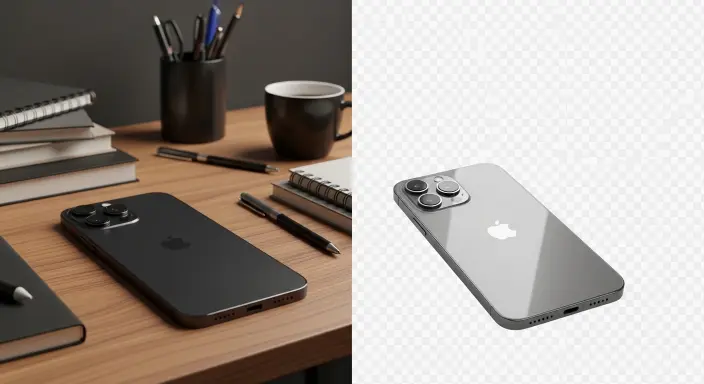
- Build Your Brand: When you photo background, you can put yourself in a clean, professional color. This makes your brand look high-end.
- Sell More Products: If you sell things on Amazon or eBay, a white image background is a must. It keeps the customer’s eyes on the product, not the distractions.
- Better SEO: Clean images are usually smaller in size. This helps your site load faster, and Google loves fast sites!
2. How to Change the Background of a Photo Online Free (Step-by-Step)
You don’t need a fancy computer. You just need our WP Skillz Background Remover. Here is exactly how I do it:
Step 1: Upload Your Original File
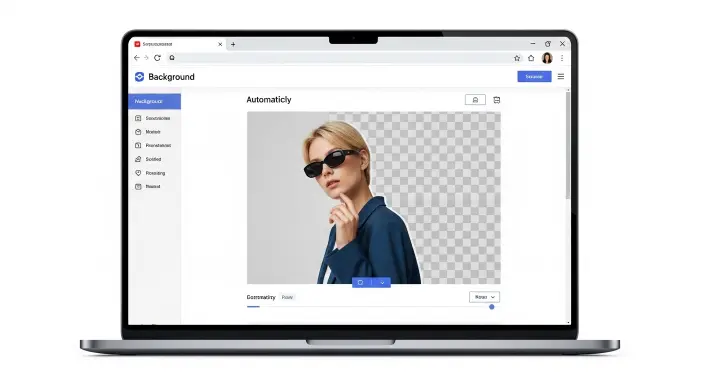
Just drag your photo into the tool. Our system supports JPG, PNG, and even WebP. It immediately starts looking for the edges of your subject.
Step 2: Let the AI Do the Heavy Lifting
The tool will background-remove everything except the main person or object. It uses something called “Edge Feathering” so that the cut doesn’t look sharp or fake.
Step 3: Pick a New Background
Now, you can use the photo background change online feature. You can keep it transparent or add a new, beautiful scene behind you. It’s like having a professional studio in your pocket!
3. Why You Need a Photo Enhancer After Removing the Background
Sometimes, the original photo is a bit blurry or dark. When you remove photo backgrounds, those small flaws become more visible.
This is where a photo enhancer comes in. Think of it like a “digital polish.” It sharpens the edges and fixes the lighting so that your new image background change looks 100% real. I always tell my students, “Don’t just cut it, polish it!”
4. Don’t Let Heavy Images Slow You Down
As a WordPress guy, I see this all the time: people upload beautiful 5MB photos and then wonder why their site is slow. When you photo, the file can become quite big.
Use a Compressor
Before you put that new image on your blog, run it through our Best JPG Image Compressor. It keeps the “Crispness” but makes the file much lighter.
Switch to WebP
In 2026, WebP is the king of image formats. Use our Online Image Converter to turn your final image background change into WebP. Your site will fly!
5. Troubleshooting: What if the Background Removal Looks Bad?
Even the best free online remove background from image tools can have a “bad day.” Here is how I fix common problems:
| The Problem | Why it Happens | My Simple Solution |
| Blurry Edges | The original photo was shaky. | Use a photo enhancer to sharpen it first. |
| Missing Parts | You are wearing the same color as the wall. | Take a new photo with more contrast. |
| Slow Loading | The file is too huge. | Compress the image before you upload it. |
6. One Final Check: Safety and Mobile View
You’ve done the work, but don’t forget these two important things:
Is it Mobile Friendly?
Most people will see your photos on their phones. Use our Free Website Responsive Checker to make sure your new image background isn’t getting cut off on small screens.
Is Your Site Safe?
Sometimes uploading lots of new media can make your site feel sluggish or vulnerable. I always recommend you scan your Website for Viruses regularly to keep your server clean and fast.
7. Common Questions (FAQs)
Q1: Is this tool really free?
Yes! You can change the background of a photo online for free on our site without any hidden fees.
Q2: Will my photo lose quality?
Our AI is very smart. It keeps your main subject high-quality while only focusing on the image background.
Q3: Can I do this on my phone?
Absolutely. Our Background Remover works perfectly on any mobile browser.
Conclusion: Make Your Photos Shine
Learning how to free online remove the background from an image online is a superpower for any creator. It’s all about making your work look professional without spending hours on it.
Take control of your visuals today. If your images still look a bit heavy or blurry after you finish, don’t forget to check our guide on Image Quality Conversion to keep everything looking sharp.
Want more tips? Watch our videos on YouTube or leave a comment on our Facebook page. I’m always happy to help!