

Schema Markup Generator: Helping Google "Understand" Your Website
Do you want Google to see more than just a wall of text on your website? When you use our schema markup generator, you aren’t just generating code; you are creating a “Digital Identity” for your brand. While search engines are great at reading words, they often struggle with context. Our tool bridges that gap by translating your content into a language machines can actually process.
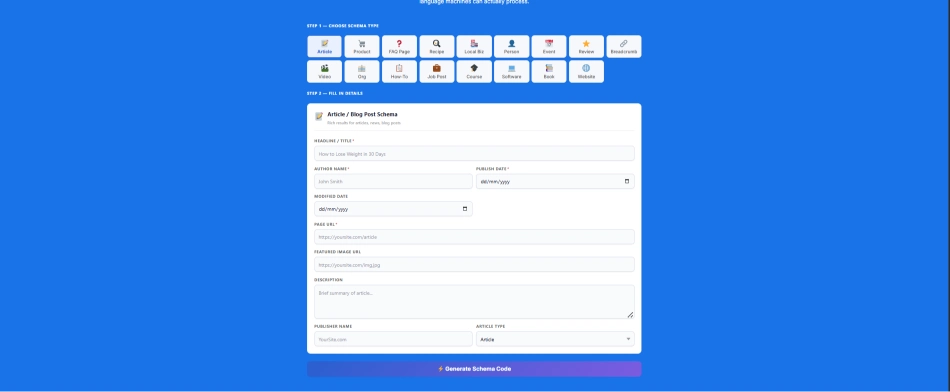
Step 1 — Choose Schema Type
Step 2 — Fill in Details
Paste this inside your page <head> or use the WordPress tab below.
⚠ Simulated preview only. Use Google Rich Results Test for exact output.
- Install WPCode Lite (free plugin)
- Go to
WPCode → Add Snippet → Add New - Choose HTML Snippet type
- Paste the code from the "Code" tab above
- Set location to
Header→ Enable → Save - For specific page: turn on "Page Specific" and select your page
[schema_markup] in any Gutenberg / Elementor pageAfter adding code: place [schema_markup] shortcode in your page using Gutenberg Shortcode block or Elementor Shortcode widget.
Enter any URL to check if valid schema markup is present on that page
⚠️ Expert Note for 2026:
I am also a website developer, and I am also an expert in SEO. In terms of 2026, this is the best tool for a schema markup generator because, in my 10 years of career, I have never seen such a tool before that has been introduced by WP Skillz. Why am I saying this?
The best thing about this tool is that it does the job for you in a few seconds, as you select the category and enter your details and it generates the code for you immediately. Secondly, you can copy it and download it. And the third and best thing is that you can also check whether it is working on your website or on the page where you have placed its markup.
Before moving forward, I would like to tell you that this tool, this schema markup generator, also tells you where to put the code. If you have a WordPress website, Shopify website, or a website in coding, then where to put this code, it will tell you the part phase in proper detail and apart from that, you can also check it on mobile and you can also check it on PC. Staying in this tool, how will your schema markup appear there and apart from that, we have other tools that you can use. Go down and use our other tools too.
Why Our Schema Markup Generator is the Gold Standard
There are many tools out there, such as the schema markup generator merkle, but we built ours based on 6+ years of hands-on SEO experience at WP Skillz.
Zero Syntax Errors: Our schema markup generator json-ld is always aligned with the latest Schema.org standards to ensure your site stays healthy in Search Console.
Deep Versatility: We don’t just stop at Articles or Products. We support over 25 specialized categories to cover every niche.
AEO Optimized: This tool is specifically designed to help your content appear in Answer Engine results.
Privacy & Speed: We do not store your data. Everything happens client-side, making it fast and 100% secure.

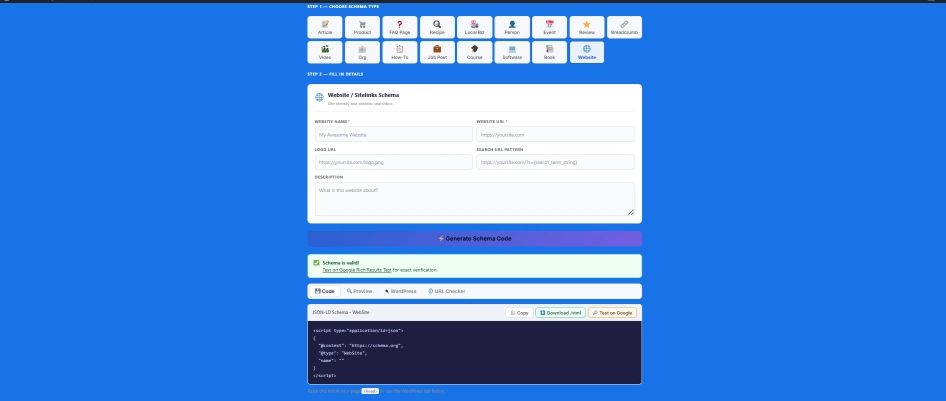
These are my tips for you that if you generate the schema code after selecting your categories, you will see four options in front of the code. First of all, you can copy the code and download it. Apart from this, you can go to the preview and see how this website schema will appear on your PC and how it will appear on your mobile.

Unique Benefits: What Makes Us the No. 1 Tool?
I’ve seen many developers struggle with manual JSON-LD. It’s frustrating when a single missing comma breaks your entire SEO. Here’s how we solve that:
Rich Snippet Mastery: Want those gold stars, price ranges, or FAQ dropdowns? Our google schema markup generator is specifically tuned to trigger these “Rich Results” that can double your click-through rate.
Contextual Intelligence: Our generator doesn’t just “spit out code.” It structures your data so Google understands the relationship between your author, your brand, and your content.
Future-Proof Tech: As Google updates its requirements (like the recent Profile Page or Discussion Forum schemas), we update our tool within hours.
Technical Deep-Dive: Avoiding "Schema Drift"
One unique challenge experts face is “Schema Drift.” This happens when the information in your schema (like a price or a date) doesn’t match the actual text on your page.
If your schema markup generator json ld says a product is $40, but your page says $50, Google will lose trust in your site. To maintain a high EEAT score, ensure your structured data is a perfect reflection of what the human reader sees. Trust is the most expensive currency in SEO today.
The "Secret" Insight: Schema and the Knowledge Graph
Here is a piece of information you won’t find on most generic blogs: Entity-Based SEO. When you use a product schema generator, you are doing more than just showing a price. You are defining your brand as an “Entity” within Google’s Knowledge Graph. By providing clear, structured details, you are helping Google connect the dots between your product, your location, and your reputation. This is how you win the EEAT (Experience, Expertise, Authoritativeness, Trustworthiness) game.
How to Use the Tool: A Relatable Step-by-Step Guide
Think of this process like filling out a simple form for a passport—you provide the details, and we provide the “official” document.
Based on my personal experience, I will give you a tip that you will remember. This tip is that when you generate the schema code with this tool, you will get four tab options below it. Go to the WordPress tab option and you can see where you have to place this code. If you don’t know where to paste the code, then which plugin can you use to add the code in WordPress? In the future, this Shopify coding solution will also be included. If you want to see it now, our blogs are there, where you can go and see all these things.
- Select Your Type: Pick the category that fits your page (e.g., faq schema generator or product schema generator).
- Provide Unique Details: Fill in the boxes. Important: Always use unique descriptions. If you copy-paste from your competitors, search engines might ignore your markup.
- Real-Time Code Generation: You will see the schema markup generator json code appearing instantly in the box.
- The Validation Step: Before going live, always use a schema markup validator to confirm the code is "Green" and ready for Google.
| Schema Type | Perfect For | Key Benefit |
| Local Business | Physical Shops/Offices | Shows your address and hours on Maps. |
| Product | E-commerce Stores | Displays price, stock, and star ratings. |
| FAQ | Information Blogs | Creates a drop-down menu in search results. |
| Organization | Brand Websites | Helps you get a Knowledge Panel on the right. |
| Article | News & Blogs | Boosts your chances of appearing in Google Discover. |
Understanding Different Schema Types for 2026
Choosing the right type is critical. If you are running an online store, woocommerce schema types markup is your best friend. Here is a quick breakdown:
As you know, you are given a type of schema markup on the right side, which is some types. If you want to see the full type, then you will get the full types above when you use the tool. In addition, we also have a blog related to it, in which you will be told in detail about each type. This tool and this block have been created with our personal experience.
A Final Professional Checklist
Before you start scanning every site on the internet, here is a quick checklist of when you should actually use this tool to get the best results:
- Does your URL contain the primary keyword?
- Did you validate your code in the Rich Results Test?
- Is your information 100% accurate and honest?
- Have you checked your site speed? (Try our PageSpeed Insights Tool)

The Bottom Line
Structured data is no longer “optional”—it is a necessity if you want to compete in 2026. By using our schema markup generator, you are taking a massive step toward search engine dominance. Start speaking Google’s language today and watch your traffic transform.
Explore Our Other Essential SEO Tools:
Smart Keyword Idea Generator – Find your next big topic.
Free Website Technology Detector – See what your competitors are hiding.
Free AI Detector – Keep your content feeling 100% human.
Frequently Asked Questions (FAQs)
What is a schema markup generator?
It is a technical tool that converts human language into a specific code format (JSON-LD) that search engines use to display rich results like star ratings and prices.
What is the best schema markup generator?
The best tool is one that is free, updated regularly, and easy to use. WP Skillz offers a premium-level generator for free to help the community build better websites.
What is a schema markup example?
An example is a “Recipe” markup. It tells Google the cooking time, calories, and ingredients so that Google can show a beautiful “Recipe Card” at the top of the search results.
How do I test my schema markup?
You should always use a schema markup validator like Google’s Rich Results Test. This ensures your code is formatted correctly and eligible for rich snippets.
What the WP Skillz Community Says


Schema Markup Blog



Schema Markup Generator

Create error-free JSON-LD with our free Schema Markup Generator. Boost rankings, get rich snippets, and optimize your site for Google, AI search.
Operating System: All Web % Mobiles
Application Category: Tool
5