

Speed Check Website: The Best PageSpeed Insights Alternative Free Tool for 2026
Let’s be honest for a second—Google’s official tools are brilliant, but they can feel incredibly robotic and intimidating. As a developer who has spent over a decade looking at code, I can tell you that I’ve spent countless nights staring at a “Core Web Vital” error that felt like it was written in an alien language. That frustration is exactly why I built this PageSpeed Insights alternative free tool right here on WP Skillz.
Speed Check Website Free Tool
Please wait a while to get accurate results. This provides the best Google results....
⚠️ Crucial Instructions for Accurate Results
To get the most precise data from our engine, do not just enter the domain name (e.g., wpskillz.com). You must enter the full URL, including the protocol (e.g., https://wpskillz.com/). This allows our speed check website free tool to analyze your SSL handshake speed and server response time accurately.
I will give you a tip from my experience: by using this tool, you can find out many things, like checking the performance of your website, checking the SEO of your website, checking the accessibility of your website, checking the best practices of your website, how much percentage is good, and how much percentage is bad, and you can optimize it. It also tells you the solution along with the problem. These are tips for you from my type. I have not seen such a role in my five-year career yet. This tool has been introduced by the WP Skillz website.
The Ultimate Mobile Website Speed Test Online Free
In my years of experience, I’ve seen a recurring tragedy: a developer builds a stunning site on a $2,000 MacBook with high-speed fiber internet. It looks perfect. But their actual customers are using a three-year-old Android phone on a shaky 4G connection.
Our mobile website speed test online simulates these real-life struggles. If your website performance is lagging on mobile, you aren’t just losing a visitor—you’re losing your hard-earned spot on Google’s first page. This tool breaks down exactly where the “bloat” is. Usually, it’s just one or two heavy scripts or unoptimized images that cause the “Mobile-First” penalty.
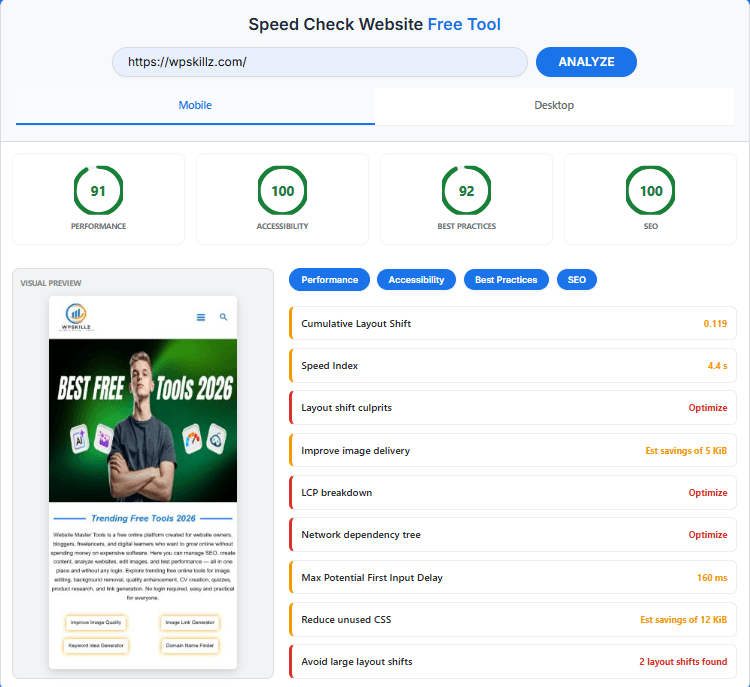
Understanding the "Big Three" of Speed (Core Web Vitals)
| Metric | What it actually means? | Good Score (2026 Standard) |
| LCP (Loading) | How fast the main content appears. | Under 2.0s |
| FID (Interactivity) | How fast the site reacts when you click. | Under 100ms |
| CLS (Stability) | Does the page “jump” while loading? | Under 0.1 |
Why Every Second Counts (The Developer’s Reality)
When I first started building websites, we didn’t worry much about a few milliseconds. But today? A one-second delay can drop your conversions by 7% or more. Think about that. If you’re making $1,000 a day, you’re losing $70 daily just because your site is a bit “sleepy.”
Our speed check website engine isn’t just about numbers; it’s about the “Real World” experience. Most tools tell you what a bot sees, but my goal with this tool was to show you what your users actually feel when they click your link from a crowded cafe or a moving train on a mobile device.
Waseem Tips :
The website speed checker tool is also the best because I found out the SEO of my website through it and how my SEO is working, and I also saw the best practices and how good they are and how bad they are. This tool told me what my problem was; I solved it and also used accessibility.
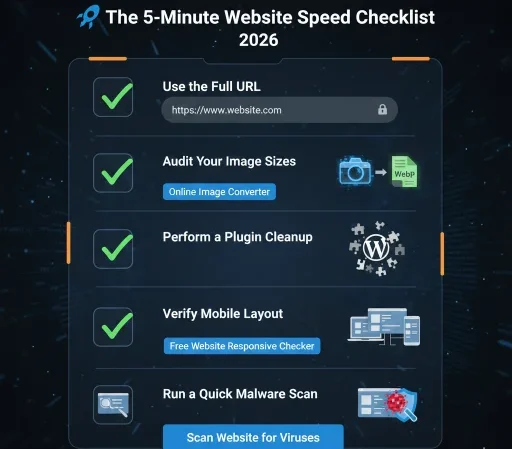
The 5-Minute Website Speed Test Checklist
- Use the Full URL: For the most accurate results, always include the protocol. Don’t just type mysite.com; instead, use https://www.mysite.com/.
- Audit Your Image Sizes: Are your images larger than 100kb? High-res photos are speed killers! Head over to our Online Image Converter and switch them to WebP format to save massive space.
- Perform a Plugin Cleanup: If you’re running a WordPress site, be ruthless. Delete any plugins you aren't using. Remember, every active plugin adds weight to your server’s back.
- Verify Mobile Layout: Does your site actually look good on a phone? Speed is nothing without a clean design. Use our Free Website Responsive Checker to ensure your layout isn't broken on smaller screens.
- Run a Quick Malware Scan: If your site suddenly feels sluggish for no apparent reason, it might be an infection. Immediately Scan Website for Viruses to rule out hidden scripts or malware.
The "Speed Killers" I See Most Often (And How to Fix Them)
After auditing hundreds of sites, I’ve noticed that 90% of speed issues come from these three things:
Monster-Sized Images: You don’t need a 5MB photo for a blog post. Use our Online Image Converter to convert them to WebP. It’s a 2-minute fix that can save seconds of load time.
Plugin Overload: Especially in WordPress. Every plugin adds a new “weight” to your server. If your WordPress website speed test is showing high “Execution Time,” it’s time to be ruthless and delete the junk.
Hidden Security Risks: Sometimes, a slow site is a sign of a “silent” malware script. Last year, a student’s site slowed down by 50% because of a hidden miner. I told him to Scan Website for Viruses immediately, and it fixed everything.
Will AI Search Engines (GEO) Recommend a Slow Website?
The world of search is changing. In 2026, it’s not just about traditional Google search; it’s about AIO (AI Optimization) and GEO (Generative Experience Optimization).
AI search engines like Gemini, ChatGPT, and Perplexity prefer “lightweight” websites. Why? Because these bots need to crawl and process information instantly to provide answers. If your website loading speed is slow, these AI bots might skip your site entirely. By keeping your site healthy using our website speed test free resource, you are literally future-proofing your business for the AI era.
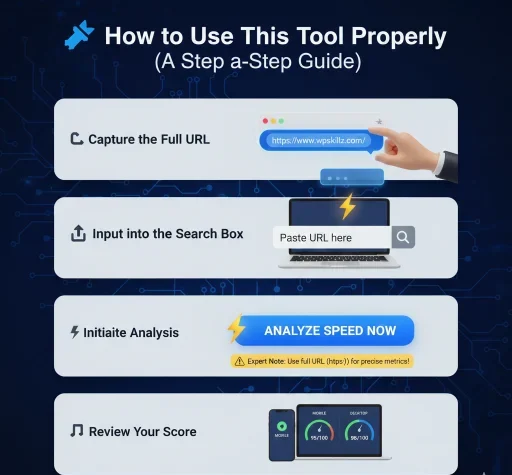
How to Use This Tool Properly (A Step-by-Step Guide)
I have made this tool as intuitive as possible, but there is one critical step you must follow to ensure an accurate WordPress website speed test result:
- Capture the Full URL: Navigate to your website and copy the complete address from your browser bar.
- Input into the Search Box: Paste the URL into our tool.
- Expert Note: Please do not enter just the domain (e.g., wpskillz.com). To get precise metrics, you must enter the full URL, including the protocol (e.g., https://wpskillz.com/).
- Initiate Analysis: Click the "Analyze" button. Our engine will immediately test your SSL handshake speed and the specific protocol your server is utilizing.
- Review Your Score: Within seconds, our system will present your mobile website speed test online score alongside comprehensive desktop performance metrics.

Waseem’s Pro Tip: Beyond the 100/100 Score
I often see people obsessing over getting a perfect 100/100 score on a Google website speed test. Don’t get me wrong, it’s a great goal, but don’t sacrifice your “Usability” for it. A site that loads in 0.5 seconds but has no images or personality is useless.
My Advice: I always tell my clients to use our Free Website Responsive Checker alongside their speed audits. It’s vital to ensure that while your page is loading, your buttons are actually clickable. Speed is the engine, but User Experience (UX) is the driver.
Pro Tips and Real Example:
If you want your website speed to be less than two seconds on both mobile and PC, then follow our instructions. First, add the URL or domain of your website and analyze the problems you see. The first problem you may see is your images. Compress these images to at least 30 to 25 KB. Then remove any CSS that is not working for your CSS. If you have a WordPress website, remove the plugins and use the Lightspeed plugin, which is very good for Hostinger.
Why Choose the WP Skillz Alternative Website Speed Test Tools?
| Feature | Google PageSpeed Insights | WP Skillz Speed Tool |
| Technical Jargon | High (Complex terms like TBT, LCP, CLS) | Minimal (Simplified for Beginners) |
| Ease of Use | Confusing for non-developers | 1-Click Analysis for Everyone |
| Guidance Style | Robotic & Automation-focused | Mentor-style “Teacher-Student” Advice |
| Login/Tracking | Often tracks user activity | 100% Private & No Data Logs |
| Actionable Tips | Hard to implement without a coder | Direct, Easy-to-follow Optimization Tips |
| Feature | GTmetrix | WP Skillz Speed Tool |
| Pricing | Freemium (Paid features for deep audits) | 100% Free (No Hidden Costs) |
| Wait Time | Often puts you in a “Queue” | Instant Results (No Waiting) |
| Sign-up Requirement | Mandatory for many features | No Sign-up / No Login Required |
| Mobile Testing | Paid / Limited in free version | Full Mobile Speed Test (Free Forever) |
| Server Locations | Limited for free users | Global Performance Perspective |
Frequently Asked Questions (FAQs)
1. Why should I use this as a PageSpeed Insights alternative free tool?
Because it’s built by a developer who understands that “Time to Interactive” is more important than a random score. We use the Lighthouse engine but remove the technical noise.
2. Is it safe to check website loading speed without login?
Yes. I value privacy above everything. We don’t store your URL, we don’t track your IP, and we certainly don’t ask for your email to show you your own performance data.
3. Does this tool support Shopify and custom sites?
Absolutely. While we specialize in WordPress website speed test analysis, our tool works perfectly for Shopify, Laravel, or any URL on the web.
4. What is a "Good" loading speed in 2026?
Anything under 2 seconds is considered professional. If you are under 1 second, you are in the top 5% of the internet.
5. Why Website Speed is the #1 Ranking Factor in 2026
Anything under 2 seconds is considered professional. If you are under 1 second, you are in the top 5% of the internet.
6. How do I perform a mobile website speed test online free?
Simply paste your full URL (including https://) into our speed check website. Our engine simulates real-world 4G/5G mobile data to give you the most accurate results possible.
What the WP Skillz Community Says



Expert Guides: Master Your Website Performance
As a developer, I don’t just want to give you a tool; I want to give you the knowledge to grow. Explore these guides to help you achieve the “Green Zone” in every speed check website test.
Here are some important tips from me for you: if you want to improve your website’s speed and it’s built on WordPress, then you must install these two plugins. One of these plugins is the Airlift plugin or the Lightspeed Cache plugin. If you have a website with Hostinger, then use the Lightspeed Cache Plugin. If you have hosting from another provider, then use the Airlift plugin, and the speed of your website will be better.



Best PageSpeed Insights Alternative Speed Check Website Tool

Test your website loading speed with our PageSpeed Insights alternative free tool. Get instant mobile website speed test online free results 100%
Price: 0 (Free Tool)
Operating System: All Device
Application Category: Speed Check Website